Invoice Due Dates & Payment Scheduling — always know what you owe, and when
You set Net 30 on a purchase order, the supplier's invoice arrives — and then nothing. The due date was something you typed in by hand (or didn't), it rendered as plain grey text, and nothing in SKU.io ever told you a payment was about to slip. Late fees, missed early-pay discounts, and a scramble at month-end were the result. Invoice Due Dates & Payment Scheduling closes that loop end to end: due dates now derive themselves from your payment terms, every invoice and bill wears a live overdue / due-soon status, a proper payables aging report shows who you owe by bucket, you can pay a supplier's whole statement in one recorded payment, and the correct due date flows through to Xero and QuickBooks Online so your accounting reports finally agree with SKU.io.
✨ What this means for you:
- Due dates set themselves. When an invoice or bill arrives without one, SKU.io derives it from the payment term — the invoice's own term, the PO's term, or the supplier's default, in that order. A manually entered date always wins.
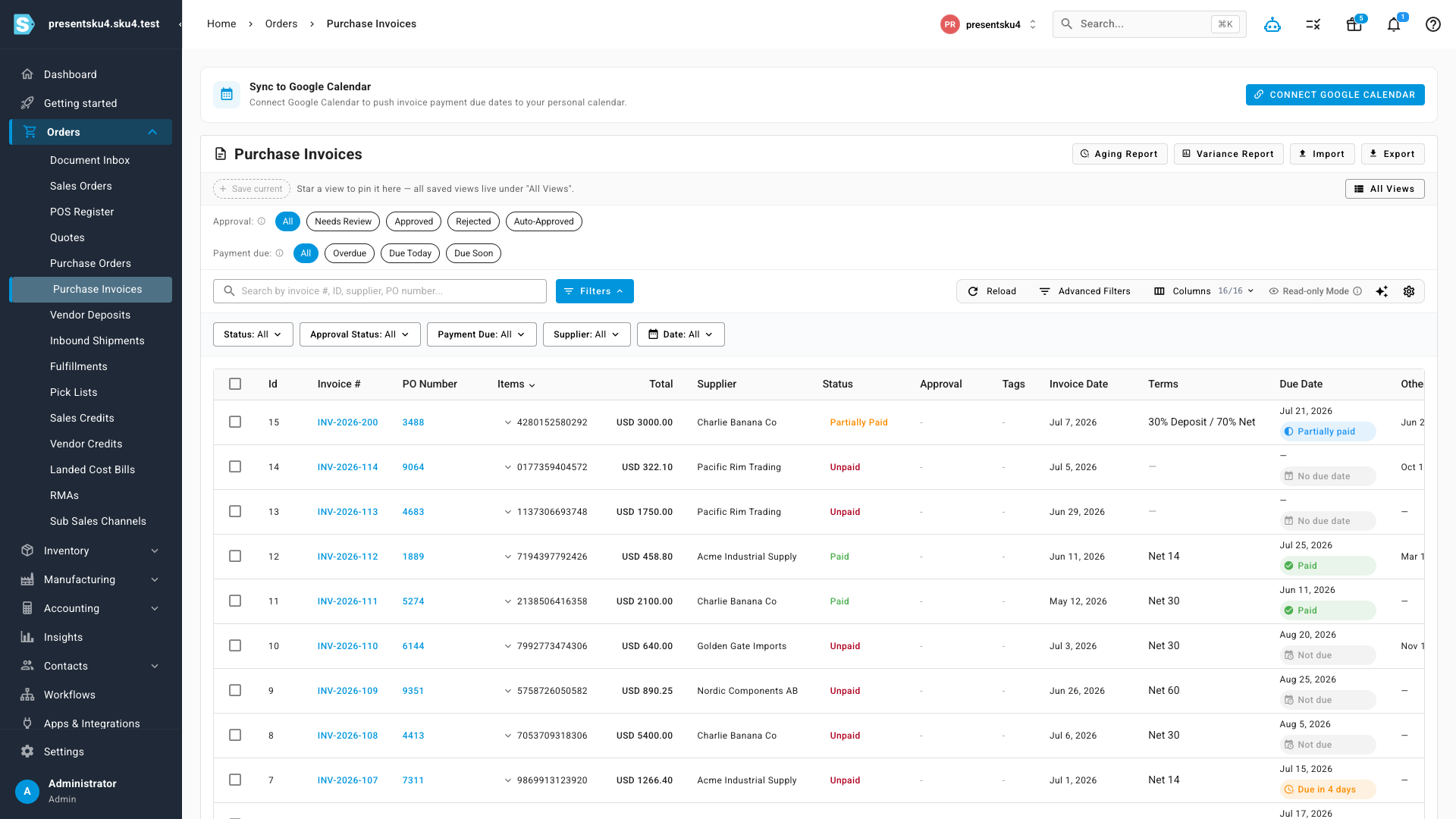
- Late is loud. Every list and detail page shows a status chip — Overdue, Due today, Due in 4 days, Not due, Paid — instead of silent grey text, with one-click Overdue / Due Today / Due Soon filters on the invoice list.
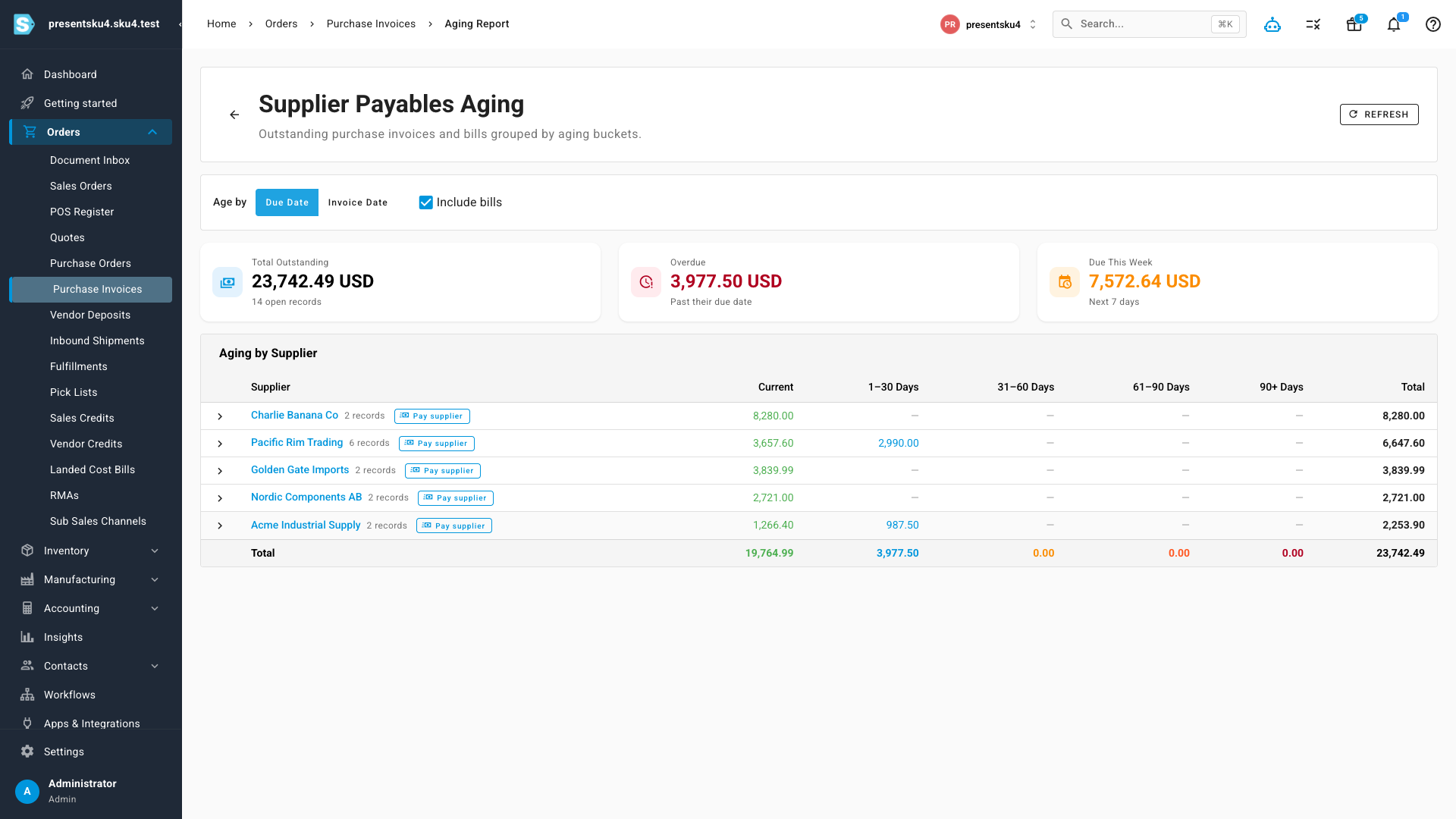
- A real payables aging report. Outstanding invoices and bills grouped by supplier across Current / 1–30 / 31–60 / 61–90 / 90+ buckets, with totals for what's overdue and what's due this week.
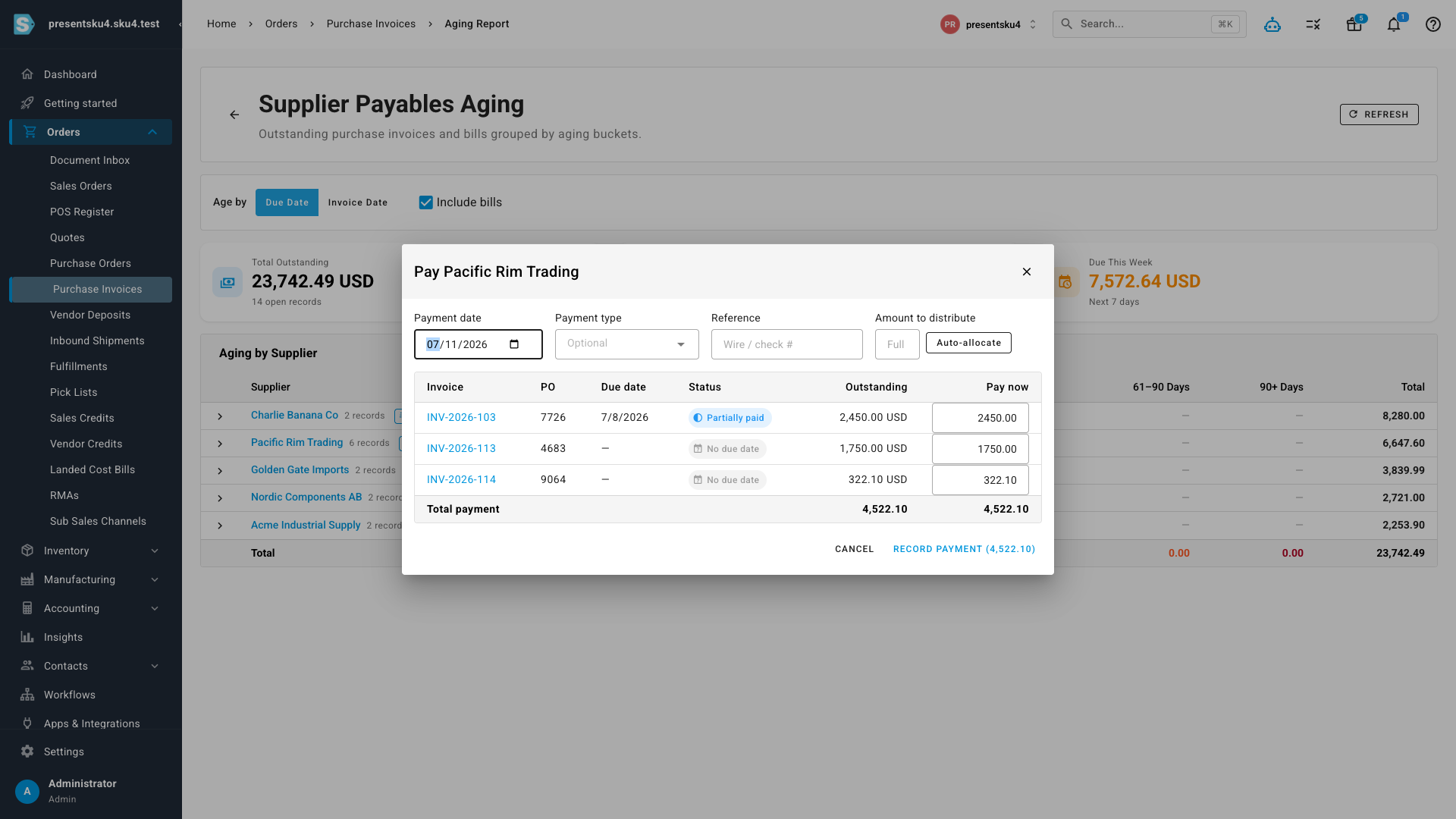
- Pay the supplier, not one invoice at a time. Record a single payment against a supplier and spread it across their open invoices — auto-allocated oldest-due-first, or fine-tuned line by line.
- Your accounting system finally shows the right date. Bills pushed to Xero and QuickBooks Online now carry the true due date — no more hardcoded "+30 days".
- Never forget a payment. Due dates sync to Google Calendar, and multi-touch email reminders fire before, on, and after the due date.
Due dates that set themselves
The payment terms you already maintain now do the work. When a purchase invoice or landed-cost bill is created — by hand, from a PO, by import, or straight out of document OCR — SKU.io resolves the applicable payment term and computes the due date automatically. A new Terms column on the invoice list shows exactly which term produced each date, and anything you enter manually is left untouched.
The list itself now reads like a to-do list: colored chips tell you each invoice's standing at a glance, quick filters up top jump straight to what's overdue or coming due, and the due-soon window is configurable so "due soon" means whatever your payment cadence says it should.
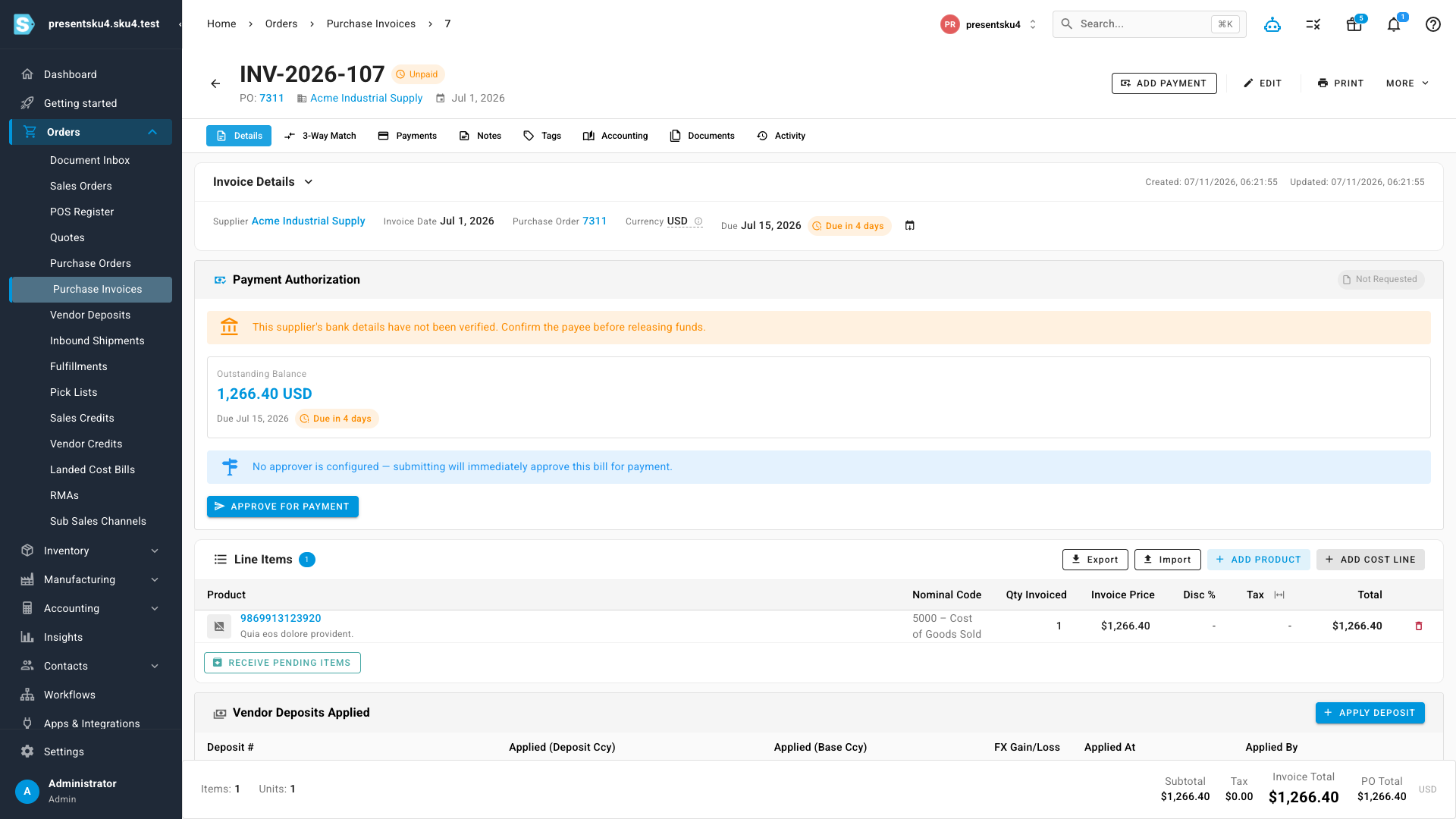
The same treatment runs through the whole AP surface — landed-cost bills, the invoice detail page, and the payment authorization panel all show the due date and its live status, so whoever approves a payment sees its urgency right where they approve it.
A real payables aging report
The invoice list gained an Aging Report button that opens a full supplier-payables aging view: every outstanding invoice and bill, grouped by supplier, bucketed into Current / 1–30 / 31–60 / 61–90 / 90+ days. Summary cards up top show your total outstanding, what's already past due, and what falls due in the next seven days. You can age by due date or invoice date (matching how your accountant reads it), include or exclude landed-cost bills, and expand any supplier to see the individual records behind each bucket.
Pay the supplier, not one invoice at a time
Suppliers send statements; you pay statements. Each supplier row in the aging report has a Pay supplier button that records one payment across any number of that supplier's open invoices. Enter the amount you're sending and Auto-allocate spreads it oldest-due-first — or type per-invoice amounts yourself. SKU.io records the allocations, updates every invoice's paid status, and keeps the run together as a single payment.
If your accounting integration is connected, the run syncs the way an accountant would enter it: one Bill Payment in QuickBooks Online covering all the linked bills, or one batch payment in Xero. And it works in both directions — record a multi-invoice payment in QuickBooks or Xero, and SKU.io ingests it as the same kind of grouped supplier payment.
The right due date in Xero and QuickBooks
Until now, bills synced to QuickBooks Online were stamped with a hardcoded "+30 days" and Xero bills just reused the document date — so the aged-payables report in your accounting system never matched reality. Bills now carry the invoice's actual due date to both providers. If you'd rather let QuickBooks control due dates itself, the push can be switched off per connection in the QuickBooks Online integration settings (it's on by default).
Calendar, reminders, and your dashboard
- Google Calendar — the invoice list has a one-click Sync to Google Calendar hookup that pushes payment due dates onto your own calendar and keeps them updated as invoices are paid or rescheduled.
- Reminders — multi-touch email reminders cover the whole arc: a heads-up before the due date, a notice on the day, and follow-ups once a payment is late.
- Dashboard — a new payables tile shows what's due and overdue the moment you log in, and upcoming invoice payments now appear in the purchase-order cash-flow schedule so your cash-out forecast includes real invoices, not just estimates.
Where to find it
- Orders → Purchase Invoices — status chips, the Terms column, quick filters, the Google Calendar hookup, and the Aging Report button (top right).
- Orders → Purchase Invoices → Aging Report — the payables aging view and per-supplier Pay supplier payment runs.
- Orders → Landed Cost Bills — the same due dates and status chips for landed-cost bills.
- Apps & Integrations → QuickBooks Online — the per-connection sync due dates toggle.