Multichannel Listing & PIM — publish to every channel from SKU.io
Until now, listings only ever flowed into SKU.io. To actually put a product up for sale you still had to log into each channel's seller portal — eBay Seller Hub, Shopify admin, Amazon Seller Central, Walmart — and re-key the same title, description, images, price, and attributes, once per channel. And because every marketplace requires different fields per category, you often didn't discover a missing attribute until the channel rejected the listing.
Multichannel Listing & PIM closes that gap. SKU.io now doubles as a Product Information Management hub that can publish new listings to and update existing listings on every connected sales channel — so your catalog is the single source of truth and each channel stays in sync with it.
✨ What this means for you:
- Publish from one place. Send a product to eBay, Shopify, Amazon, or Walmart without leaving SKU.io — no more re-keying the same data into four seller portals.
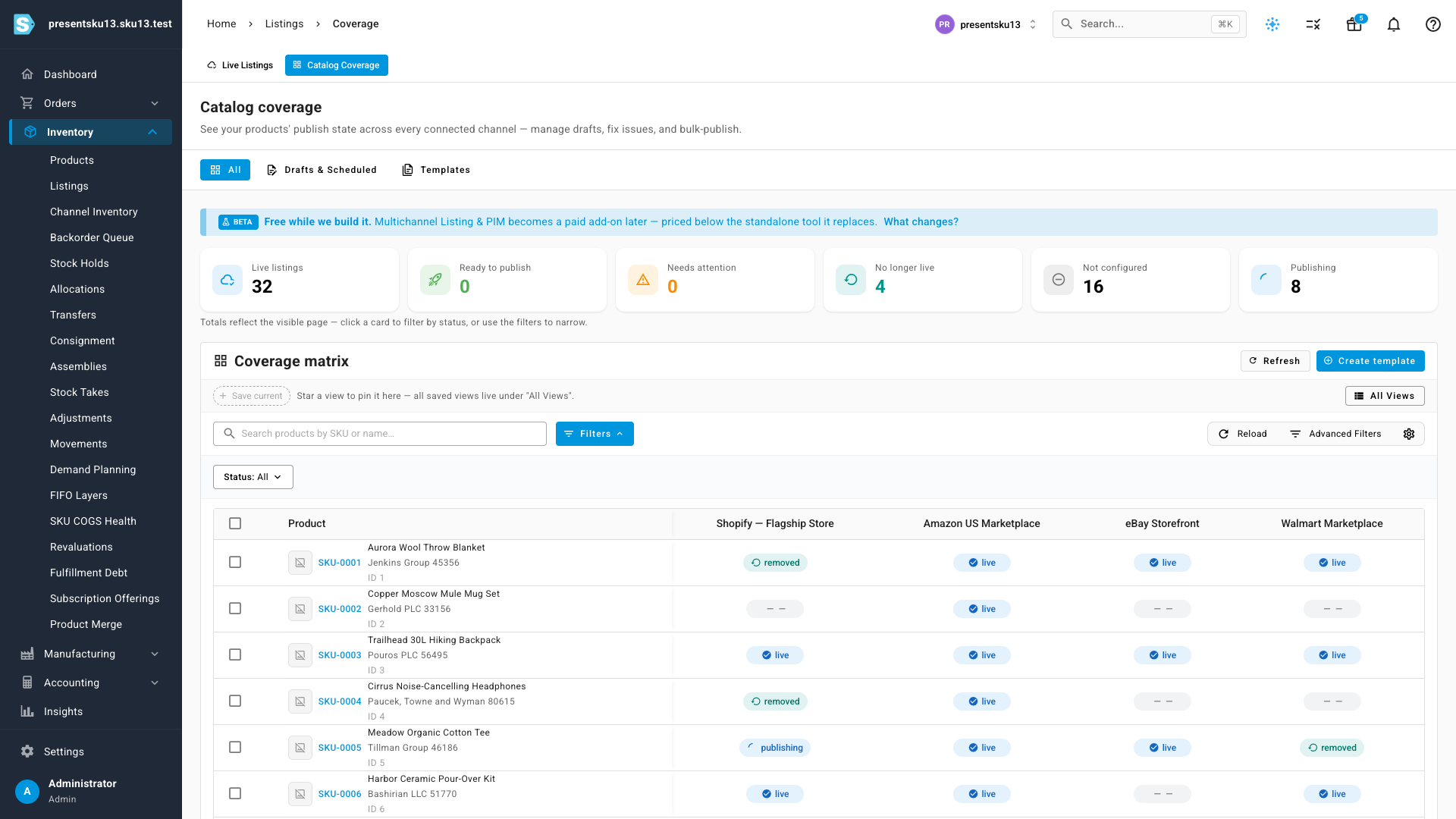
- See your whole catalog's coverage at a glance. One matrix shows every product's status on every channel — live, publishing, no longer live, or not yet configured.
- Catch problems before the channel does. Channel-required, category-specific fields are surfaced before you publish, so listings stop getting rejected for missing attributes.
- Keep channels in sync. When a product's details change in SKU.io, push the update out to the live listing instead of hand-editing each channel.
- Manage the whole lifecycle. End a listing on a channel, retry a failed publish, or bulk-publish a set of products — all from inside SKU.io.
One home for every channel listing
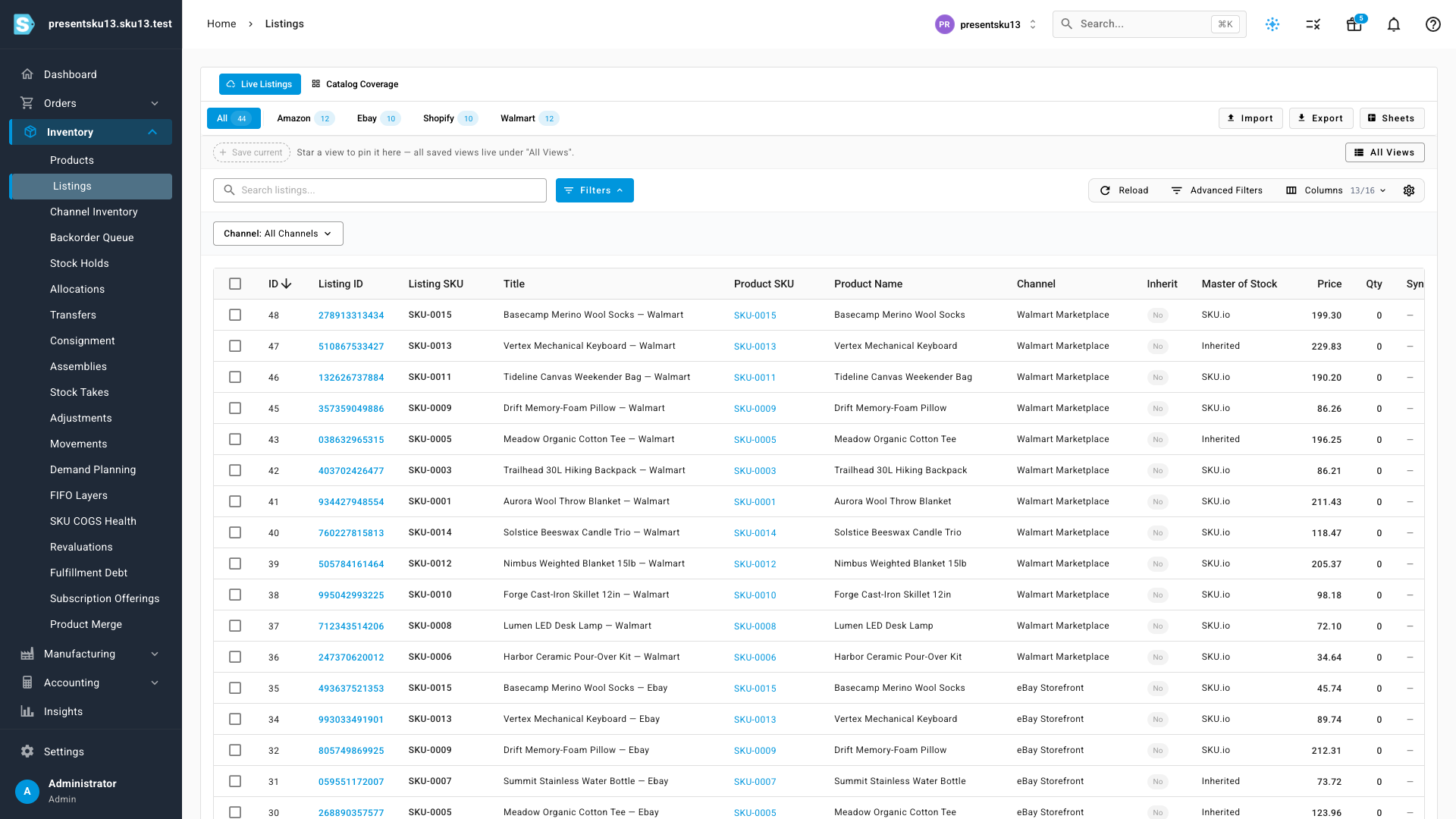
The new Listings workspace brings every channel listing into a single, filterable table. Switch between all channels or drill into just Amazon, eBay, Shopify, or Walmart, and see each listing's SKU, title, channel, price, and stock-of-record side by side.
See your whole catalog's coverage at a glance
The Catalog Coverage view answers the question every multichannel seller asks: what's live where, and what still needs attention? Each product gets a row, each connected channel gets a column, and every cell shows that product's real publish state on that channel — live, publishing, removed, or not yet configured. The summary cards up top roll it all up so you can jump straight to what needs work.
Templates make repeat publishing effortless
The first time you publish to a channel you map your product data onto that channel's fields. Save those choices as a template — a reusable bundle of category, field defaults, and pricing profile for a channel — and every subsequent publish becomes pick-a-template-and-review. The 2nd, 3rd, and Nth product go live in seconds instead of minutes.
Where to find it
Open Inventory → Listings in the left sidebar. Use the Live Listings and Catalog Coverage tabs at the top to switch between your live listings and the coverage matrix, and the Templates tab to manage your reusable publish templates.
Multichannel Listing & PIM is rolling out to accounts now and is free while it's in beta. If you don't see it yet, it's on its way.