FBA Inbound for 3PLs & Suppliers — hand off the whole shipment, kits and all
Sending an FBA replenishment through a 3PL or supplier has always meant a scramble of emails — FNSKU labels in one attachment, box-content rules in another, prep instructions pasted into a note, and a separate back-and-forth just to confirm anything actually shipped. FBA Inbound for 3PLs & Suppliers replaces all of that with one clean handoff. When an inbound plan is sourced from a 3PL warehouse or a supplier, SKU.io packages everything the recipient needs into a single branded portal and emails them the link. And when a line is a kit your 3PL still has to assemble, SKU.io spells out exactly what to build and allocates the components so you can't oversell them.
✨ What this means for you:
- One secure link instead of a pile of attachments. Your 3PL or supplier gets a single portal with everything for the shipment — no more chasing labels and instructions across email threads.
- Documents show up as they're ready. FNSKU labels, prep instructions, box-content and pallet forms, and the Bill of Lading appear in the portal automatically the moment you generate them.
- Kits that must be built are unmistakable. The portal tells the 3PL exactly which kits to assemble and from which components — and SKU.io allocates the component stock so it can't be sold out from under the build.
- A real confirmation comes back. The recipient confirms the shipment is ready to ship, and that status flows straight back to you — no guessing whether it went out.
Set it up from the inbound plan
Every FBA inbound plan now has a Fulfillment step. When the plan is sourced from a 3PL or supplier, SKU.io resolves the source, picks the delivery channels (email + portal), and assembles the document set for you. The prep instructions are generated to match the shipment — small-parcel vs. LTL/freight, partnered-carrier label rules, the box-content manifest — and you can edit them before sending.
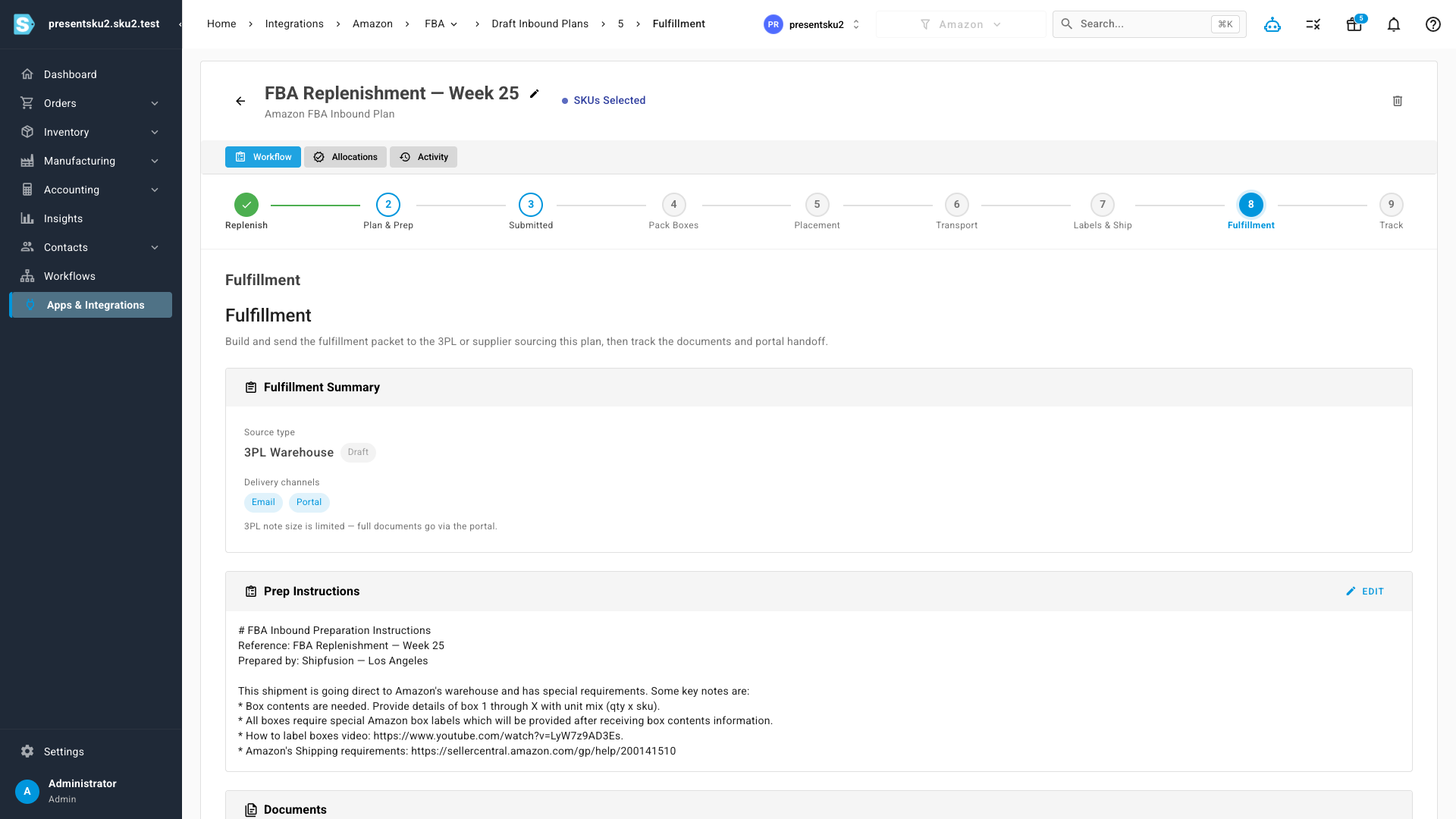
One click sends the packet: the recipient is emailed a secure link, and the documents you've already generated are attached automatically.
Everything the 3PL needs, in one portal
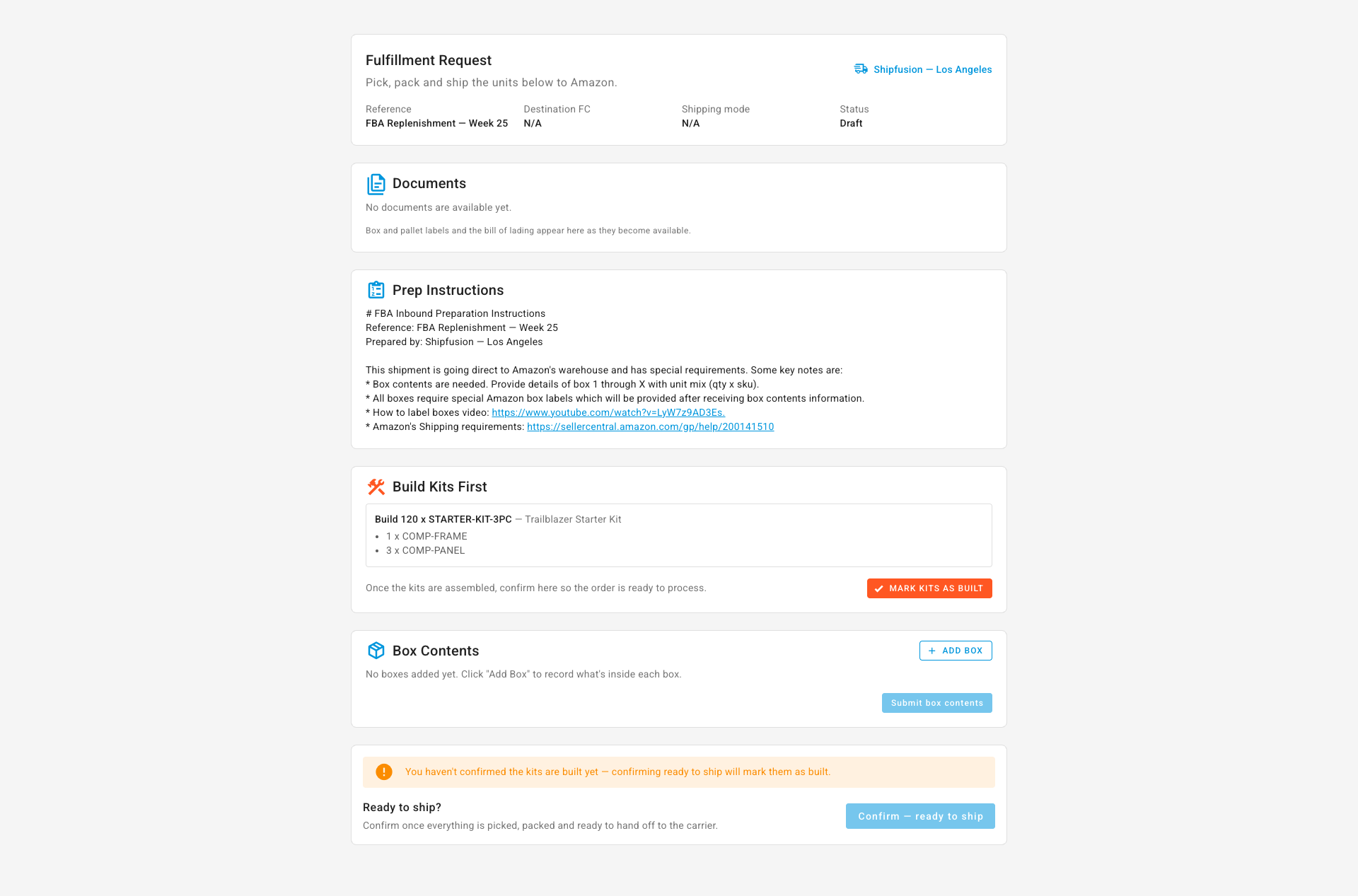
The link opens a clean, focused portal — no SKU.io login required. The recipient sees the order reference and destination, downloads the labels and prep instructions, records box contents (and pallet details for freight), and confirms when the shipment is ready to ship. The Bill of Lading appears here too, closer to pickup.
Kits your 3PL builds — handled
If a kit isn't already assembled at the 3PL, it has to be built before it can ship to Amazon. SKU.io now handles that end to end. When you choose to source a kit from its components, SKU.io allocates the components the moment the plan is verified — so they can't be oversold while the inbound is in flight — and the portal shows the 3PL a clear Build Kits First checklist: how many to build and exactly which components go into each one. When the 3PL marks the kits as built, SKU.io converts the allocated components into finished kit stock automatically. If the kit is already in stock at the 3PL, it simply ships as-is — no extra steps.
Where to find it
Open any Amazon FBA inbound plan sourced from a 3PL or supplier and go to the Fulfillment step (Apps & Integrations → Amazon → FBA → Draft Inbound Plans → your plan → Fulfillment). Build the packet, review the instructions, and send — your 3PL or supplier takes it from there in the portal.