Match marketplace returns to RMAs
When a customer returns something they bought on a marketplace, the return is created on the channel — Shopify, Walmart, or Trackstar opens its own return record before anything reaches SKU.io. The Returns Inbox is where those channel return records get linked to SKU.io RMAs, so a marketplace return flows into the same receiving, disposition, and reconciliation path as any other return. Until a channel return is linked, it's just a notice sitting in the inbox; once linked, it's a real RMA you can receive and reconcile.
Most of the time the inbox keeps itself clear — a scheduled job matches new returns every hour. This guide covers the two things you do by hand: running that match on demand, and resolving the returns it couldn't match automatically.
Before you begin
- You need the returns.update permission — both Match Returns Now and bulk linking require it.
- You need at least one connected channel that feeds the inbox: Shopify, Walmart, or Trackstar. Amazon and TikTok returns create their RMAs directly and do not appear in the inbox by design.
1. Open the Returns Inbox
Go to Orders → RMAs and open the Returns Inbox tab (route /v2/rma/inbox). The subtitle reads "Marketplace returns awaiting linkage to RMAs."
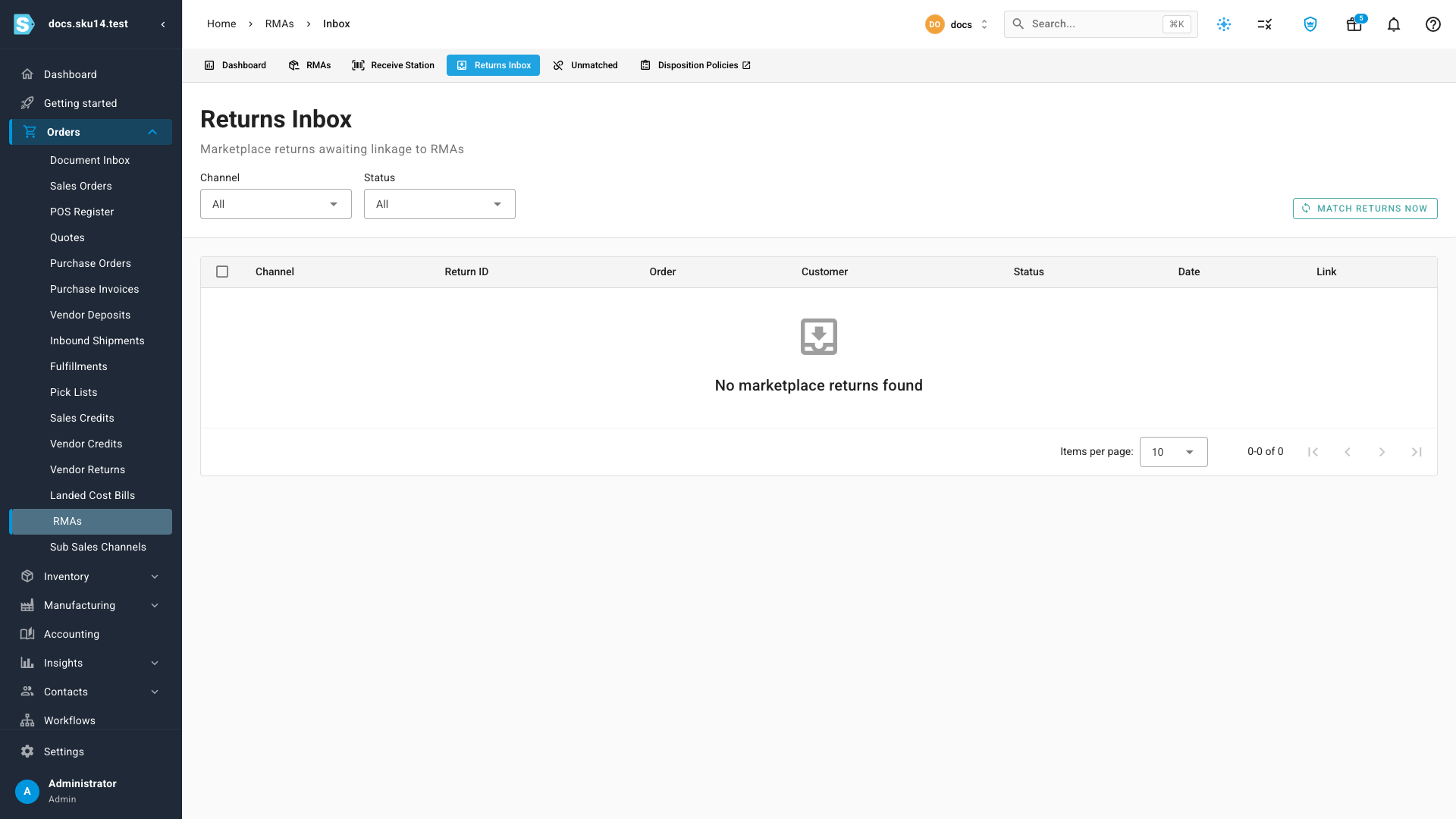
On this tenant there's no live marketplace channel, so the inbox shows its empty state — "No marketplace returns found." Once a channel has synced returns, each one lands here as a row until it's linked to an RMA.
2. Review pending returns
When the inbox has returns, each row is one marketplace return record:
| Column | What it shows |
|---|---|
| Channel | A colored source chip for where the return came from — Shopify (green), Walmart (blue), Trackstar (purple). |
| Return ID | The channel's own return identifier. |
| Order | The originating marketplace order. |
| Customer | Who's sending the goods back. |
| Status | Linked (already tied to an RMA) or Unlinked (still needs matching). |
| Date | When the return was created on the channel. |
| Link | If linked, a link straight to the RMA. If not, a suggested-order link when SKU.io has inferred which order it belongs to. |
Two filters narrow the list:
- Channel — All, Shopify, Walmart, or Trackstar.
- Status — All, Linked, or Unlinked.
Filter Status → Unlinked to see only the returns that still need work. The suggested-order link in the Link column is your hint that a match exists — the automatic matcher will usually resolve those on its own.
3. Match returns
Click Match Returns Now (top right) to link every unlinked return you can, right now. It dispatches a tracked Match Marketplace Returns job — watch its progress in the job tray — that walks the unlinked returns and links each one it can resolve.
For each return, the matcher:
- Finds the marketplace order the return belongs to.
- Reuses an open, unlinked RMA already on that order, or creates a Draft RMA if there isn't one.
- Links the return to that RMA.
Matching is keyed on the channel + external return ID, so it's safe to re-run and safe against channel re-syncs — the same return never links twice. Match Returns Now is fully idempotent; running it back-to-back does nothing the second time. This is the same job that runs automatically every hour, which is why the inbox usually stays clear on its own — the button is just for when you want it done immediately.
Once a Shopify return is received in SKU.io, its received status syncs back to Shopify, so the channel reflects that the goods arrived.
4. Link by hand when needed
Some returns can't be matched automatically — most often a conflict, where more than one candidate order matched and SKU.io won't guess. Those stay Unlinked for a person to resolve.
To link them yourself, tick the checkbox on each row you want and use Link Selected. The result summarizes what happened, counting returns as:
| Result | Meaning |
|---|---|
| Created | A new Draft RMA was created and linked. |
| Linked | Linked to an existing open RMA on the order. |
| Already linked | Was already tied to an RMA — skipped. |
| Conflict | More than one candidate order matched, so it was not linked. Resolve it by hand. |
| No match | No order could be found for the return. |
A conflict is the one that needs judgment: the automatic job deliberately leaves it alone rather than link the wrong order, so open the return, decide which order it belongs to, and link it from there.
How this differs from Unmatched Returns
The Returns Inbox and the Unmatched Returns report both connect a return to an RMA, but they work on different data:
| Returns Inbox | Unmatched Returns | |
|---|---|---|
| Links… | Marketplace return records (Shopify / Walmart / Trackstar) | Physical blind receipts taken at the Receive Station |
| Starts from | A return the channel already opened | Goods that arrived with no expected RMA |
| You do | Auto-match or bulk-link to RMAs | Link each receipt to an RMA or sales order |
If a return exists on the channel, it belongs in the Returns Inbox. If someone received a box at the dock with nothing to match it to, that's an Unmatched Return.
Related
- How returns reconciliation works — the full picture of how returns, RMAs, and receipts line up.
- Link unmatched (blind) returns — the other place returns get connected to RMAs.
- Process a customer return (RMA) — create, ship, and receive an RMA end to end.
Video transcript
Marketplace returns start on the channel, not in SKU.io. Open Orders, RMAs, then the Returns Inbox to see returns awaiting linkage. Filter by channel or status, then click Match Returns Now. The tracked job links each return to an open RMA or creates a Draft one. When a match conflicts, tick the rows and Link Selected by hand.